


Dell KACE K2000 Systems Deployment Appliance
Provision systems with an easy-to-use, comprehensive, affordable solution

Sorry, this product is no longer available, Please contact us for a replacement solution.
Overview:
Save your organization money and time using the leading systems deployment appliance, the Dell KACE K2000 Deployment Appliance. Now you can deliver fast, efficient, fully integrated and automated systems provisioning and software distribution, with all the systems deployment tools you need. Its appliance-based architecture lowers cost of ownership while simplifying large scale systems deployments, multi-platform imaging, user state migration, and remote site management.
A recent EMA analysis showed that while KACE appliances equal or exceed the functionality of their competitors, when factoring in total infrastructure expenses, the KACE solution can cost significantly less than offerings from primary competitors.
With mixed operating systems and multiple system configurations for different departments becoming the norm, it’s increasingly more complex to provision systems. And the complexity grows with the number of applications to support, as well as the sheer quantity of associated drivers, prerequisites, patches and configuration settings to apply across a variety of devices. As a result, successful and efficient deployment of systems, especially on a larger scale, has become one of the top challenges for today’s IT professional.
The Dell KACE K2000 Systems Deployment Appliance makes it easy to fulfill all of your organization’s systems provisioning needs, with capabilities for inventory assessment, OS and image deployment, user state migration, system configuration, application installation, and recovery.
Traditional disk imaging software solutions require complex and timeconsuming deployments. They can also be very costly and may not fully automate systems provisioning. The K2000 drastically reduces complexity and cost with an appliance-based architecture by providing a fully integrated solution that greatly improves the speed and reliability of systems provisioning.
The K2000 is part of family of systems management products from Dell KACE that are available as both physical and virtual appliances. Your organization can choose from a variety of deployment options and leverage your investment in a VMware infrastructure.
Benefits:
- Deployment in less than a day
- Training in hours via a webbased tutorial
- Upgrades that take mere minutes
- Low total cost of ownership
- No hardware or software prerequisites
- No incremental professional service fees
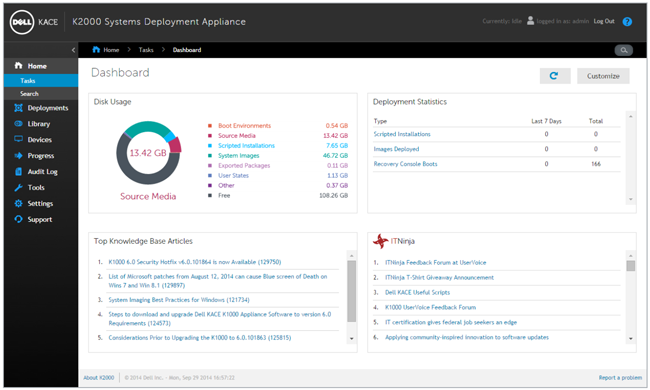
Designed to save you time and your organization money, the KACE K2000 Systems Deployment Appliance typically installs in less than one day at a low total cost.
Features:
The KACE K2000 Deployment Appliance fulfills your software distribution needs with fast, efficient provisioning:
- Disk imaging – Save image creation and maintenance time by automating these steps in the deployment process.
- Image deployment – Improve provisioning consistency and reliability with a global, centralized deployment library that ensures that the correct image or setup is always deployed to the appropriate systems.
- Task automation engine – Reduce complexity and improve reliability with the K2000's powerful automated deployment tools, including the task sequencing engine, the task scheduling engine and the feedback engine
- Multicasting – Improve the speed and reliability of large-scale deployments, freeing up network resources and bandwidth.
- Windows deployment and updates – Easily migrate files and settings and manage Windows updates. Conduct driver updates for all the machines you support with one click.
- Network OS install – Streamline the installation of operating systems across your network, perform systems deployment and maintain up-to-date gold master images across diverse hardware platforms.
- Remote site management – Deploy systems from a central location, eliminating unnecessary travel or the shipment of media and systems, and reduce the time and complexity associated with managing multiple remote sites.
- Administration – Streamline systems provisioning, systems recovery and deployment with an easy-to-use, web-based interface with built-in reporting and automated maintenance.
- Centralized administration – Enables easy, centralized systems deployment and recovery via an integrated webbased console.
- Computer inventory scanning and assessment – Collects detailed hardware inventory on target systems.
- Centralized deployment library – Stores deployment assets in one easy-tomanage, secure location.
- Hardware-independent imaging – Provides industry-standardized native imaging that streamlines image capture and management as well as reduces storage costs for a growing portfolio of hardware and operating systems.
- Windows driver management – Automatically downloads the latest drivers by computer model, as well as provides a driver harvesting tool and hardware inventory to make working with drivers easy.
- Customizable pre- and postdeployment configuration – Automates all deployment tasks, such as RAID and BIOS configuration, application installation and your own scripts.
- Network boot architecture – Allows provisioning of deployment assets over the network, even for baremetal machines.
- Windows network OS install – Enables hardware-independent provisioning of any system.
- Multicasting – Sends the same bits of deployment data simultaneously to multiple devices to greatly increase speed and reliability of large-scale deployments as well as reduce consumption of network bandwidth.
- Windows user state migration – Centrally captures, stores and deploys user-specific settings and files, enforces compliance by excluding files by type and location, and offers a single-step offline migration.
- Remote systems repair and recovery – Recovers systems using native Windows and Mac tools—including native imaging tools.
- Integrated reporting – Eases systems deployment and appliance administration.
- Offboard storage – Enables the addition of Network Attached Storage using the Network File System protocol to allow the K2000 to grow with your needs.
KACE Appliance Architecture:
Dell KACE appliances offer a smarter “anypoint” systems management approach that saves your organization time and money. KACE solutions use a pre-integrated bundle of operating environment and application software via a dedicated server appliance. This appliance-based architecture enables you to plug KACE solutions into an existing network where they begin functioning immediately.
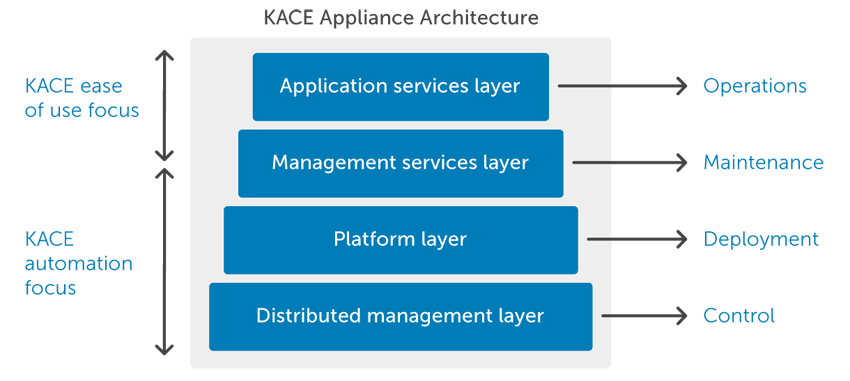
Benefit from a complete solution that's fully integrated from metal to function. Each layer has been designed to work exclusively with and leverage the purpose-built services of its adjacent layers to maximize its performance, reliability and ease of use.
Appliance Benefits
Appliance architecture focuses on automating deployment and maintenance of the solution — and enables you to concentrate on the completion of actual management operations. The net effect is breakthrough efficiency, economy and dependability.
Pre-integrated bundle of operating system and application software in a dedicated server appliance helps you fulfill your endpoint systems management needs — from initial systems deployment to ongoing management and retirement.
Flexible deployment options allow you to use KACE products as on-premises physical or virtual appliances, or as a hosted option. You don't need to contend with hardware or software infrastructure prerequisites, open-ended professional services engagements, disruptive offsite training or custom integration costs.
Pre-tuned, hardened and self-monitoring solutions that include layers for application services, distributed management, common management services and hardware- and software-based platforms promote superior scalability, greater performance, higher usability and faster deployments.
Specifications:
| K2100 | K2200 | |
|---|---|---|
| Features | ||
| Disk Imaging | ||
| Windows Network OS Installation | ||
| Windows Driver Harvesting | ||
| Windows User State Migration | ||
| Centralized Deployment Library | ||
| Pre & Post Deployment Configuration | ||
| Remote Site Management | ||
| Remote Systems Repair & Recovery | ||
| Computer Inventory Scanning & Assessment | ||
| Integrated Reporting | ||
| Capacity | ||
| Recommended Maximum Managed Nodes | 100-3,000 | 3,000-20,000 |
| Storage | 1 TB | 3.6 TB |
| Image Capacity (Number) | 80 | 160 |
| Hardware | ||
| Processor | One Intel E5-2603V3, 1.6 GHz CPU | Two Intel E5-2620V3, 2.4 GHz CPU |
| Network Interface | Dual 1 Gigabit Ethernet Ports | Dual 10 Gigabit Ethernet Ports |
| Memory | 8 GB | 16 GB |
| Disk Drives | Two Hot Plug 1 TB, 7200 RPM SATA Hard Drives | Four Hot Plug 1.2 TB, 10000 RPM SAS Hard Drives |
| RAID Level | 1 | 5 |
| Power Supply Unit | Single, Auto Ranging, 550 W PSU | Redundant, Auto Ranging, 550 W PSU |
| Appliance Form Factor | 1 RU | 1 RU |
| Rack Mount Kit | Sliding rails for 19-inch, 4-post rack | Sliding rails for 19-inch, 4-post rack |
System Requirements
Operating System Requirements
The K2000 physical appliance has the following operating system requirements.
- Windows
- Windows 8.1 (Professional, Enterprise)
- Windows 8 (Professional, Enterprise)
- Windows 7 (Professional, Enterprise, Ultimate)
- Windows XP SP3 – latest (Professional, Tablet PC Edition, Media Center Edition)
- Windows Server 2012 R2 (Foundation, Essentials, Standard*, Datacenter*)
- Windows Server 2012 (Foundation, Essentials, Standard*, Datacenter*)
- Windows Server 2008 R2 (Web Edition, Standard Edition, Enterprise Edition, Datacenter Edition, HPC Edition)
- Windows Server 2008 (Web Edition, Standard Edition, HPC Edition)
- Windows Server 2003 (Web Edition, Standard Edition, Enterprise Edition, Datacenter Edition, HPC Edition)
- PXE-enabled network interface
- X86 system architecture
- Windows 64-bit support
- Mac
- Mac OS X 10.7 (Intel only) – 10.9
*Cannot be running in Server Core mode
Browser Requirements for the Web-Based User Interfaces
To access the K2000 Administrator Console web-based user interface, use a monitor with a screen resolution of at least 1280 pixels by 800 pixels and one of the following web browser applications.
- Internet Explorer 9.x or later
- Firefox 3.x or later
- Safari 3.x or later
- Chrome 38.x or later
Screenshots:
Home page
Once logged in, a focused summary of all essential information is available on the K2000 home page. Also available here is a guided tour to bring any new users up to speed on the appliance.
Centralized Storage of OS Media
Import all of your operating system source CDs once to the K2000, and they can then be accessed anytime from any network workstation to automate the gold master creation process. The K2000 desktop source CD uploader facilitates the CD upload process.
System Imaging
The K2000 uses a flexible file-based image format called K-imaging. K-imaging eliminates redundant file transfers, saving time in the capture, storage and deployment of images. Adding a 30 GB image that has only 1GB of data that differs from the current image library will only require 1GB of storage versus 30GB. System imaging also leverages the same drag-and-drop pre- and post-installation tasks that scripted installations use.
Hardware Independent Provisioning
A single network OS installation can be used to provision multiple hardware configurations. The K2000 queries its driver library and automatically includes the correct drivers for each setup. Users can also easily add drivers to the K2000 library. Driver verification reporting helps ensure all required drivers are present in the deployment library and that every network OS installation deployment is successful.
Scripted Installation
Scripted installation allows you to create an unattended installation of Windows, regardless of the hardware target. Drivers are automatically pulled from the K2000 driver library.
Automated Deployment
K2000 boot actions allow scripted installations to be deployed automatically the next time a target machine boots. Systems can be remotely booted using integrated Wake-on-LAN functionality.
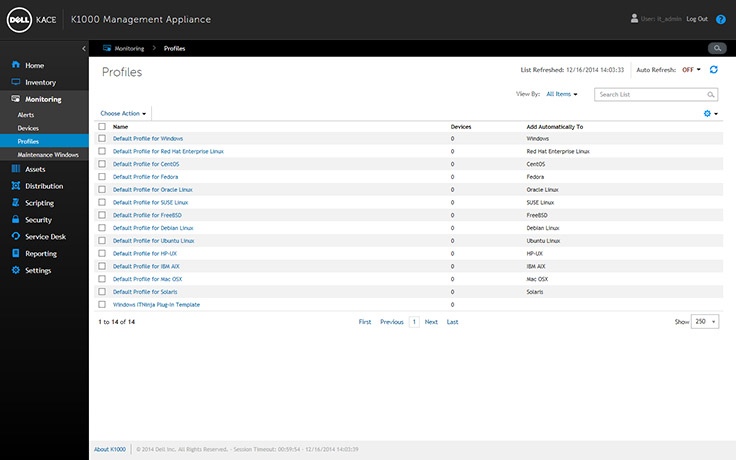
Pre- and Post-Installation Tasks
The K2000 automates the execution of pre- and post-installation tasks through an easy-to-use, drag-and-drop interface. You can use the example tasks or create your own. These can range from partitioning a drive to installing your office applications.
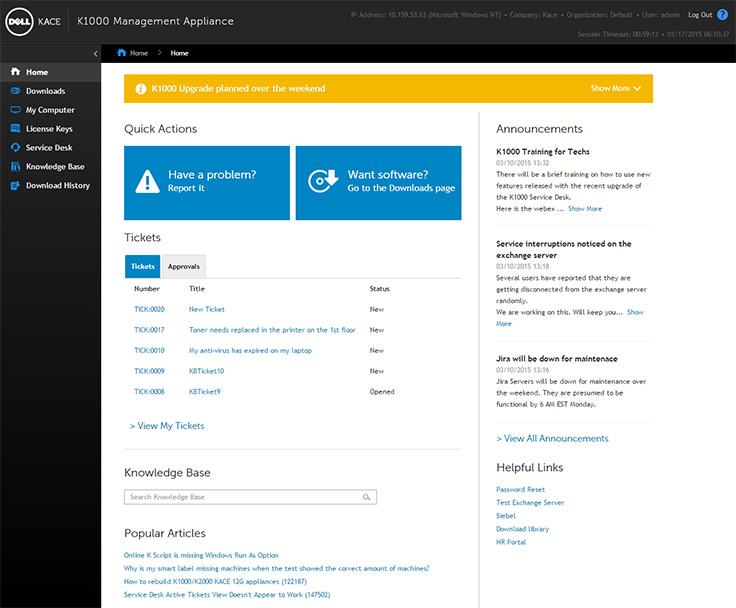
Multicast Deployment
Multicasting greatly increase speed and reliability of large scale deployments and reduce network bandwidth by sending the same 'bits' of deployment data simultaneously to multiple devices . K2000 extends the power of multicasting by enabling two-way communication between target devices and the server, allowing for status updates and rebroadcast requests. You will no longer have to guess on a deployment's progress; the K2000 web console provides all the information in real time.
Task Engine
The K2000's powerful task engine controls the order of a deployment's tasks, greatly enhancing the reliability and efficiency of traditional multicasting. The task engine makes sure deployments go smoothly, reboots are handled gracefully, and ensures that the K2000 server is updated in real-time with the status of a target device's deployment. This enables true 'lights off' deployment.
User State Migration
With K2000 user state migration, you can capture and deploy user-specific files and settings along with an operating system and applications.
Recovery
The K2000 Pre-Boot Environment (KPE) allows any machine on your network to boot to the K2000 instead of its hard drive. This allows administrator access to the K2000 recovery menu on any computer, even if it will not boot from its local hard disk.
Remote Site Management
The K2000 Appliance will be your central storage repository, while allowing you to spin up virtual remote site appliances to increase performance at remote sites. Deployment assets are cached at remote locations with smart synchronization, along with bandwidth and timing controls, to minimize the strain on the headquarters network.
Supports & Maintenance:
Standard Support & Maintenance
Standard Support and Maintenance includes:90 days phone support and ongoing e-mail, chat support and access to KACE's online support portal and knowledgebase. Maintenance includes access to KACE data feeds (patching, OVAL, AppDeploy Live) and product updates
- 1 Year Standard Support & Maintenance available at 15% of our price.
- 2 Year Standard Support & Maintenance available at 14% of our price.
- 3 Year Standard Support & Maintenance available at 13% of our price.
Enterprise Support & Maintenance
Enterprise Support and Maintenance includes: Phone, e-mail, chat support and access to KACE's online support portal and knowledgebase. Maintenance includes access to KACE data feeds (patching, OVAL, AppDeploy Live) and product updates
- 1 Year Enterprise Support & Maintenance available at 20% of our price.
- 2 Year Enterprise Support & Maintenance available at 17.5% of our price.
- 3 Year Enterprise Support & Maintenance available at 15% of our price.
- Standard Support includes 90 day phone support after which only e-mail support is provided
- Enterprise Support includes phone support for the duration of the support contract as well as e-mail support
- Enterprise Support requires a minimum annual support and maintenance fee of $7,000
KACE JumpStart Programs:
Accelerated implementation and training program for Dell KACE K Series Appliances
Typical software-only management solutions require extensive training that may require expensive travel and demand that you be away from the office and daily responsibilities.
Fortunately, each JumpStart Program is completed in just hours on the web, enabling IT administrators of all levels to master advanced systems management activities quickly and effectively. These sessions give you all the information you need to start saving time and money with the Dell KACE appliances.
Delivered either by Dell KACE or a Dell KACE Certified Partner, the JumpStart Program ensures that your KACE appliance will be properly installed and configured for your environment. You and your team will get targeted, hands-on training to maximize the value of your investment in the least amount of time.
What services do KACE JumpStart programs include?
- Installation assistance – When you purchase a KACE appliance you won’t be left on your own. Professionals will walk you through the first-time process of installing and configuring your appliance.
- Insight into appliance utilization best practices – Experts will help you launch your appliance along a best practices path, to ensure appliance capabilities are optimized for your environment.
- Report creation – The program will familiarize you with report creation and utilization to ensure you understand how to leverage both standard and customized reports.
- Online training – Train online in hours, with no travel required.
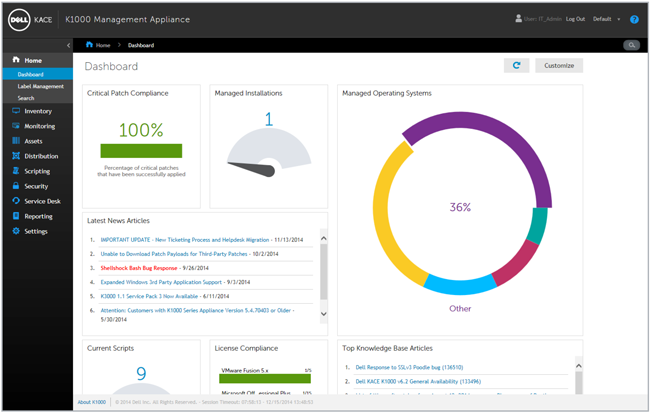
Flexible web-based training helps you make the most of your investment quickly and effectively
Flexible and individualized Dell KACE JumpStart training
JumpStart programs are conducted in two-hour sessions and are scheduled at your convenience. Choose a general overview track with Standard JumpStart, or to gain the broadest and in-depth product knowledge, choose the Enterprise training track. In addition, each track comes with the option of choosing from several eKcellence Packs that will help you hone in on specific areas of interest.
Note: Due to time constraints, Standard JumpStarts are focused on subject matter most often requested/used by customers. Not all topics are covered in depth.
Choose from the following eKcellence Packs available
eKcellence Pack modules provide indepth training in specific areas of focus allowing you to customize your training curriculum. With the Standard JumpStart track you select two modules, and with the Enterprise JumpStart track you select five. These 1-hour modules can be modified over the life of your program, can be added ad hoc throughout the year, or purchased separately if you would like additional training.
| Appliance series | ||
|---|---|---|
| Standard JumpStart1 |
|
|
| Enterprise JumpStart2 |
|
|
| K2000 Deployment Appliance | Standard eKcellence Packs | Enterprise eKcellence Packs |
| Mac imaging basic | ||
| Mac imaging advanced | ||
| Remote site appliance | ||
| Custom driver feed | ||
| User State Migration Tool (USMT) | ||
| USB imaging | ||
| Boot environment customization | ||
| Advanced SysPrep | ||
1 Standard JumpStart is required for all deployments under 1,000 nodes, and have the option to upgrade to Enterprise JumpStart to gain the broadest, in-depth product knowledge.
2 Enterprise JumpStart is required for deployments over 1,000 nodes.
3 Asset packs eKcellence Pack is an additional optional training session for K1000 customers who have purchased the Asset Packs for inventory and management of Chromebooks and non-computing devices.
4 Server monitoring eKcellence Pack is an additional mandatory training session for K1000 customers who have purchased the Server Monitoring add-on functionality.